Facebook MCP server for AI agents
Skip screen recorders and dodgy converter sites: downloadVideoFb MCP brings Facebook reels, videos and watch pages straight into your AI assistant


What downloadVideoFb MCP gets you from a Facebook link
Give it a Facebook post, reel or watch link and it returns direct download URLs for every quality and format on offer.
-
Download Facebook videos
Paste a public Facebook post that carries a video and get back direct links to each quality and format it offers.
-
Download Facebook reels
Reels are covered as well: the agent replies with direct links to the clip, so you can save it right away.
-
Download from watch URLs
Links from facebook.com/watch and the short fb.watch form point to one video, and it downloads the same way.
Download Facebook videos and reels wherever your MCP client runs
Chat apps, code editors, scripts of your own: one tool serves them all, as long as they speak MCP.
Facebook MCP server
Public videosPaste a single block into your client’s config once — after that, just ask for a Facebook video any time you want one.
{
  "mcpServers": {
    "downloadvideofb-mcp": {
      "type": "http",
      "url": "https://api-wh.downloadvideofb.net/facebook/mcp"
    }
  }
}Can you download this reel? facebook.com/reel/…
download_facebook_video(url="facebook.com/reel/…")
Done — I found the reel in HD and SD. Both are MP4 files you can download now.
Want me to get links for another video on this page as well?
Add downloadVideoFb MCP to ChatGPT, Claude or another MCP client
Choose your app, then work through its steps
Fits every client with MCP support · the config file just lives in a different place.
-
In your client, go to the MCP settings and open its config file, most often
mcp.json. -
Put the downloadVideoFb entry inside
mcpServers:{ "mcpServers": { "downloadvideofb-mcp": { "type": "http", "url": "https://api-wh.downloadvideofb.net/facebook/mcp" } } } - Save your changes and restart the client to pick up the server.
-
Start a fresh chat and request a video:
- Download the reel at facebook.com/reel/…
- I need the HD version of fb.watch/…
Any ChatGPT plan will do · turn on Developer mode first.
- Log in to chatgpt.com.
-
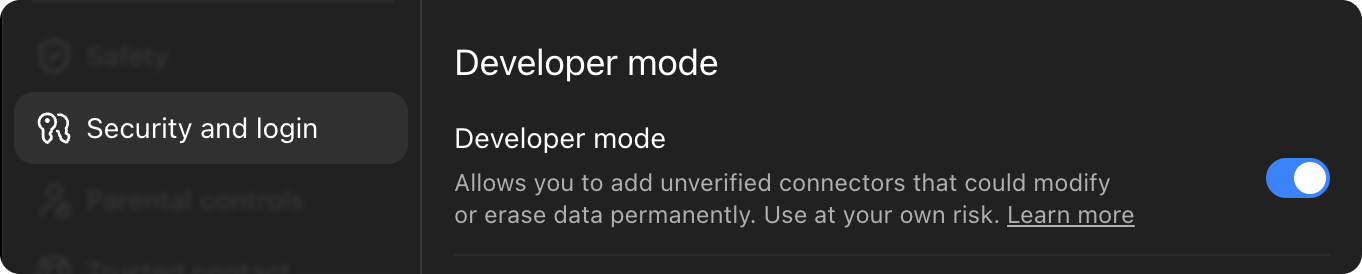
Go to Settings → Security and login, then turn on Developer mode.
- Leave the settings and go to chatgpt.com/plugins.
-
Click the + button at the top right, then pick Create plugin.

-
Enter this server address:
https://api-wh.downloadvideofb.net/facebook/mcp - Set authentication to OAuth and press Connect — some accounts see Sign in instead.
- In the window that pops up, sign in or register and grant access.
- That’s it: enable downloadVideoFb from the tools menu in any chat.


There are no commands to learn: describe what you need and the assistant reaches for the downloadVideoFb tool itself.
Pro, Max, Team or Enterprise · custom connectors are not on the free Claude plan.
- Log in to claude.ai.
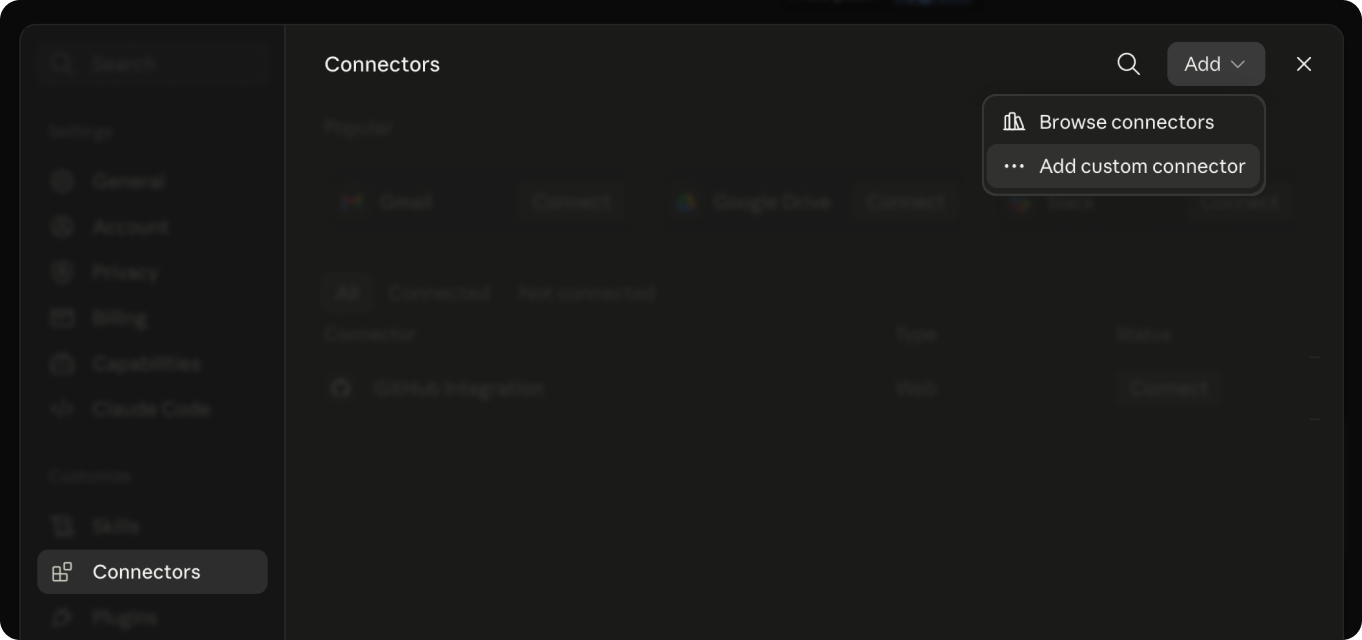
- Open the menu under your name at the bottom left and go to Settings → Connectors.
-
Pick Add custom connector.
-
Paste the server address, then click Add:
https://api-wh.downloadvideofb.net/facebook/mcp - Click Connect; a new window asks you to sign in or sign up and grant access.
- In a new chat, enable downloadVideoFb from the tools menu below the input field.

Don’t see the connector? Refresh the page and make sure it’s enabled in that chat’s tools menu.
Paid Claude plan required · desktop app on macOS or Windows.
- Download the Claude app for your computer, launch it and log in.
- Go to Settings → Connectors.
-
Pick Add custom connector.
-
Paste the server address, then click Connect:
https://api-wh.downloadvideofb.net/facebook/mcp - Your browser opens a tab where you sign in or sign up and grant access.
- Back in the app, downloadVideoFb is now listed among your tools.
Older builds of the app lack custom connectors — if the option is missing, install the latest update.
Terminal · Claude Code has to be installed.
- Set up Claude Code and log in; it walks you through this on first launch.
-
Add the server by running:
claude mcp add --transport http downloadvideofb-mcp https://api-wh.downloadvideofb.net/facebook/mcp -
Launch Claude Code and enter
/mcp. - Select downloadvideofb-mcp, then Authenticate — a sign-in page opens in your browser.
- Log in or sign up, grant access, then return to the terminal.
- You’re ready: name the Facebook video you want and Claude Code takes it from there.
downloadvideofb-mcp is just a local name for the server, so you can choose any other.
Not working?
- No sign-in window, or it shows an error. Let your browser open pop-ups from this site, then connect once more.
- downloadVideoFb went quiet or vanished from your tools. Delete the connector and re-add it using the same address.
- You can’t find a Connectors section. Make sure your plan comes with connectors and that you run the latest app or site.
- You were logged out. Sessions expire now and then — press Connect or Authenticate to sign back in.
Every plan unlocks the full toolset
Begin with 50 free requests — no card required. Try it now-
Pro
$15.00 /mo
Included:
- 10,000 requests a month
- Fixed monthly limit, never billed for extra
- Proxies built in
- Complete MCP access
-
Recommended
Ultra
$69.00 /mo
Included:
- 60,000 requests a month
- Fixed monthly limit, never billed for extra
- Proxies built in
- Complete MCP access
-
Mega
$199.00 /mo
Included:
- 250,000 requests a month
- Fixed monthly limit, never billed for extra
- Proxies built in
- Complete MCP access
Payment happens in your assistant too: in a ChatGPT, Claude or other chat with downloadVideoFb connected, ask for a payment link and it comes back in the answer.
Mega not enough? Write to us and we’ll put together a plan for your volume.
Frequently asked questions
Short answers on fetching Facebook videos with your AI assistant.
-
MCP (Model Context Protocol) is an open standard that lets AI assistants use outside tools and data. A server offers the tools, and the assistant chooses when to use them.
-
Any assistant with MCP support. The setup guides walk through ChatGPT and Claude (web, desktop app and Claude Code), and a universal config covers the rest.
-
No. downloadVideoFb MCP only handles public Facebook videos — posts that are private or limited to friends can’t be reached.
-
In any chat with downloadVideoFb turned on, ask the assistant for a payment link and it will provide one. There is no checkout page on this site.
Ready to give it a try?
Hand Facebook video and reel downloads over to your AI assistant — connecting takes minutes, and you stay in the app you work in every day.
- Every available quality and format
- Works with posts, reels and fb.watch
- No software to install or maintain